A MagSafe creator accessory

Your phone's best camera is on the back.

MagMirror turns your rear camera into a professional content creation studio — screen mirroring, pro-grade lighting, and hours of power, all in one MagSafe-compatible accessory.
See how it worksJoin the list
Kickstarter
$51K raised
Backers
479
Patent
Filed, USPTO
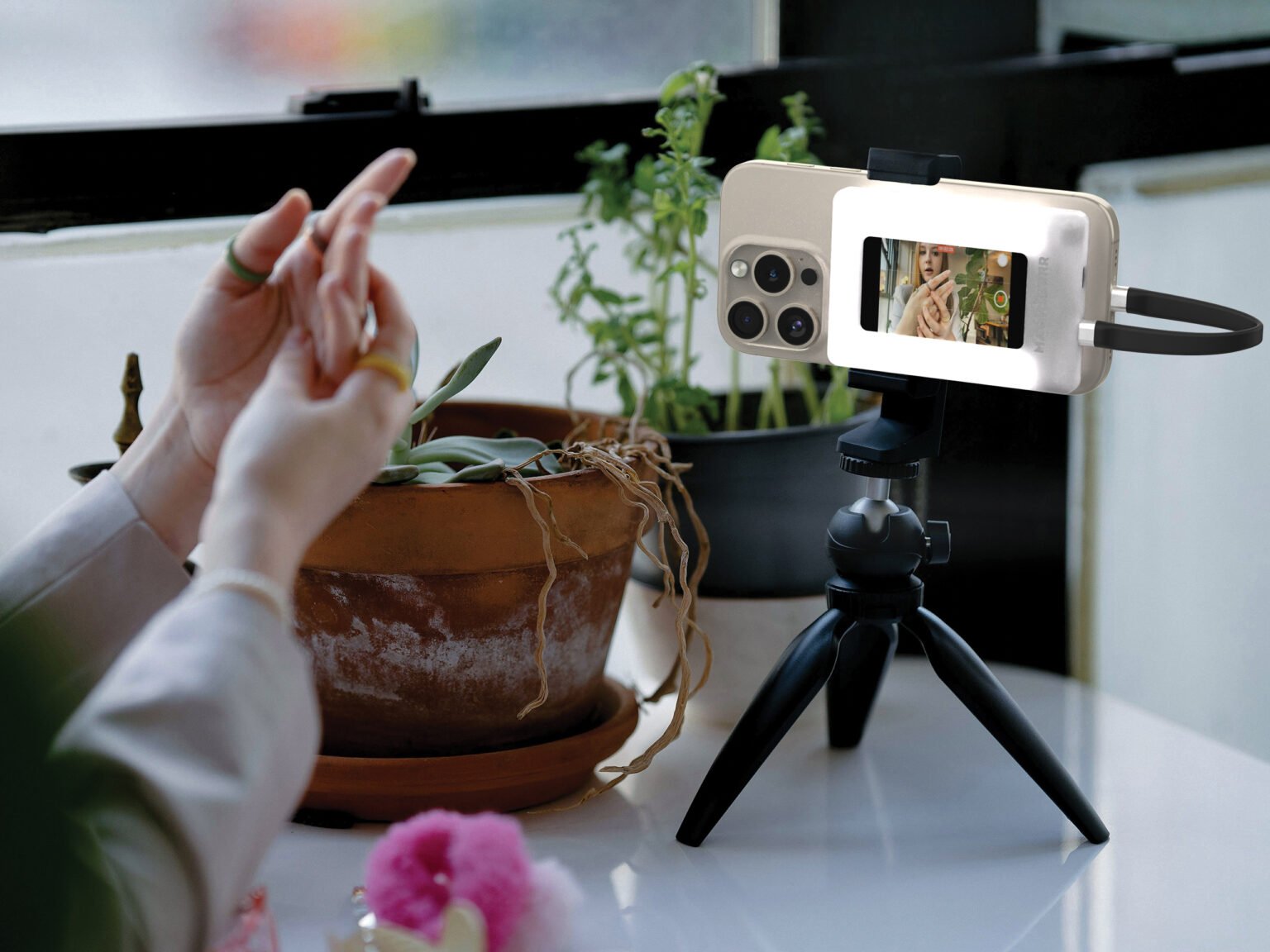
MagMirror mounted on a phone and tripod, mirroring the rear camera's live preview on its built-in display
01What it does

Three tools, one device. A complete creator setup that clips onto your phone.

01 / Feature

Screen mirroring

A built-in display mirrors your phone's screen on the back, so you can frame vlogs, selfies, and live streams with your high-quality rear camera instead of the front one.

02 / Feature

Professional lighting

Four LED modes — soft, warm, bright, and party — keep your footage lit for any setting, from makeup tutorials to late-night streams.

03 / Feature

Built-in power

Up to 5 hours of independent runtime, plus 4 hours of wireless charging for your phone. Shoot all day without chasing an outlet.

02With / without

The difference MagMirror makes, line by line.

Without MagMirrorWith MagMirror
Framing
Mediocre front camera, soft selfies, low dynamic range.
Rear camera's best glass — sharp, detailed, cinematic.
Preview
Flip the phone back and forth, hope the shot landed, reshoot.
Live mirror on the back — see yourself as the lens sees you.
Lighting
Pray for good light or carry a separate ring light.
Four LED modes built in — soft, warm, bright, party.
Power
Battery drains in an hour of filming. Outlet hunt.
5h independent runtime, plus 4h wireless charge for your phone.
Built for creators

Built for people who film with their phones every day.

MagMirror started as a fix for a specific frustration — you want to vlog with your phone's best camera, but you can't see what you're shooting. We built a single device that solves it, and added the lighting and power you'd otherwise be lugging around separately.

A family selfie taken using MagMirror — everyone in sharp focus thanks to the rear camera and built-in lighting
03How it works

Three steps between you and a professional-grade creator setup.

Step 01

Snap it on

MagMirror clicks on via MagSafe to any compatible iPhone. For older iPhones or Android, use the included adapter ring — same instant attach.

Step 02

Frame with the back

Flip the phone around. The built-in display mirrors your screen so you can see yourself while shooting with the rear camera's best glass.

Step 03

Dial lighting + shoot

Pick a lighting mode — soft, warm, bright, or party — and start creating. Built-in power keeps you rolling for hours, no outlet needed.

04Proof of demand

Validated on Kickstarter. Patent pending. Pre-production.

Validated
$51,000
Kickstarter raise in 2.5 hours
Validated
479
backers across the launch campaign
Validated
19/053,315
USPTO patent application filed
05Frequently asked

Questions we get most often.

MagMirror uses MagSafe to snap directly onto any MagSafe-enabled iPhone. For phones without MagSafe — including Android handsets like OnePlus, Xiaomi, Oppo, Vivo, Sony, Motorola, and Nokia — an included adapter ring handles the attach. Screen mirroring requires DP-Alt Mode support on the host phone.
06What's next

Be the first to know when MagMirror ships.

One email when there's something real to share — no giveaways, no spam.